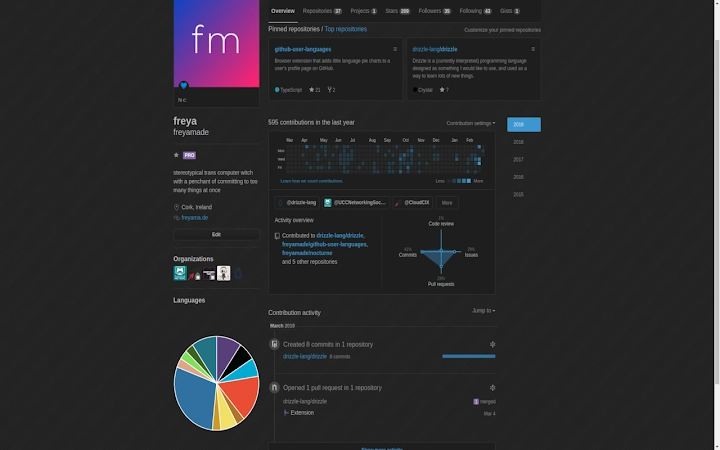

Visualize GitHub Code Languages in a Pie Chart
Overview
GitHub User Languages is a lightweight browser extension designed to enhance the GitHub profile experience by displaying a pie chart that visualizes the programming languages used across a user or organization’s public repositories. The tool provides an immediate, at-a-glance summary of coding preferences, making it easier for developers, recruiters, and collaborators to assess technical focus without navigating through individual repositories. This extension integrates directly into the GitHub profile page, offering real-time insights into language distribution based on publicly available data.
It is particularly useful for professionals evaluating potential team members, contributors, or open-source projects. The extension supports both individual developers and organizations, providing a consistent visual representation regardless of profile size. By leveraging GitHub’s official language color palette, it ensures accurate and recognizable representation of each language. The developer did not provide additional background information about the project’s origins or development goals.
Key Features & Capabilities
- Pie Chart Visualization – Displays a dynamic pie chart on the GitHub profile page, showing the proportional usage of programming languages across public repositories.
- Language-Specific Navigation – Each segment of the pie chart is interactive, allowing users to click on a language to view a filtered list of repositories associated with that language.
- Official GitHub Language Colors – Uses the exact color codes assigned by GitHub to each programming language, ensuring consistency and immediate recognition.
- Real-Time Data Sync – Automatically updates the chart when new repositories are added or when language statistics change on the profile.
- Seamless Browser Integration – Works across supported browsers without requiring additional setup or configuration beyond installation.
For example, a recruiter reviewing a developer’s profile can instantly identify their primary languages and drill down into specific projects. A contributor exploring a project’s ecosystem can assess the language diversity of an organization. The extension enhances workflow efficiency by reducing the time spent manually analyzing repository metadata.
User Interface, Workflow & Performance
The extension’s interface is minimal and unobtrusive, appearing directly beneath the profile header on GitHub. The pie chart is cleanly rendered with clear labels and color-coded segments. Navigation is intuitive: clicking any segment triggers a filtered view of repositories in that language, redirecting the user to a dedicated list. The workflow is streamlined, requiring no additional steps beyond installation and profile access.
Performance is optimized for speed and low resource usage. The extension does not modify the core GitHub interface, relying instead on client-side rendering. The developer did not specify resource usage details. Based on general software behavior patterns, the tool operates efficiently without noticeable impact on browser performance. Stability appears consistent, as the extension functions reliably across multiple GitHub profiles and repository sizes.
Compatibility & System Requirements
GitHub User Languages is compatible with Windows, Mac, and Linux operating systems. It supports all modern browsers that allow extension installations, including Chrome, Firefox, and Edge. The installation size is 1.4 MB, indicating a lightweight footprint. The extension does not require administrative privileges or complex setup procedures.
Exact system requirements were not listed. Compatibility information was partially provided. The tool functions within the browser environment and does not depend on specific hardware configurations. No additional dependencies are required for operation.
Pros and Cons
Pros
- Simple, clean interface that enhances GitHub profile readability
- Interactive pie chart enables quick navigation to language-specific repositories
- Uses official GitHub language colors for accurate visual representation
- Free to use with no hidden costs or ads
- Lightweight and fast, with minimal impact on browser performance
Cons
- Only works on public GitHub profiles with visible repository data
- Does not support private repositories or non-public profiles
- Depends on browser extension support, which may vary across platforms
- Limited customization options for chart appearance or data display
FAQ Section
Is GitHub User Languages available for all browsers?
The extension is designed to work with modern browsers that support extensions, including Chrome, Firefox, and Edge. Compatibility may vary depending on browser policies and update cycles.
Can I use this extension on private GitHub profiles?
No, the extension only displays data from public repositories. It cannot access or visualize information from private profiles or repositories.
Does the extension collect user data?
The extension accesses only public GitHub repository data through the GitHub API. No personal or private user information is collected or stored.
How often does the chart update?
The chart updates automatically when the profile page is refreshed or when new repositories are added to the account. Updates are synchronized in real time with GitHub’s public data.
Is there a desktop application version?
No, GitHub User Languages is a browser extension and does not have a standalone desktop application. It runs entirely within the browser environment.
Final Thoughts
GitHub User Languages delivers a focused, elegant solution for developers and technical evaluators who need quick insights into coding language usage. Its clean design, real-time data integration, and seamless navigation make it a valuable addition to any developer’s browser toolkit. While limited to public profiles and offering no customization, its simplicity and reliability stand out. For professionals seeking to assess technical expertise at a glance, this extension provides a clear, visual advantage.
Download GitHub User Languages now







